![UK Argo [logo]](/themes/ukargo-NOC8X/logo.svg)
The global Argo database is continuously updated as new observations are added and existing data are revised following expert quality control and calibration. Updates can affect both real-time and delayed-mode data.
To ensure you are working with the most complete, accurate and up-to-date Argo observations, always download and use the most recent data snapshot available.
How to access Argo data?
Argo data are made available as near-real-time data within 24 hours of an Argo float surfacing anywhere in the global ocean. These data are ingested into global ocean models and distributed through the Global Telecommunication System (GTS). Within approximately one year, the same profiles are quality-controlled in delayed mode, providing higher-quality data for scientific applications.
A video tutorial demonstrating how to access Argo data with guidance from our experts.
Where to find Argo data?
Argo float data are be freely accessed from either of the two Global Data Assembly Centres (GDACs). These data include float metadata, detailed trajectory data, profile data and technical data all in NetCDF format.
- International Argo Data Access Services
- Argo GDACs: IFREMER Coriolis, France.
- Argo GDACs: US Global Ocean Data Assimilation Experiment (GODAE) Data Centre
- Argo marine floats data and metadata from Global Data Assembly Centre (Argo GDAC)
- ERDDAP Data Server - download subsets of scientific datasets in common NetCDF file formats.
- Unidata’s Thredds Data Server (TDS) provides metadata and data access for scientific datasets
Argo Data Structure at GDAC
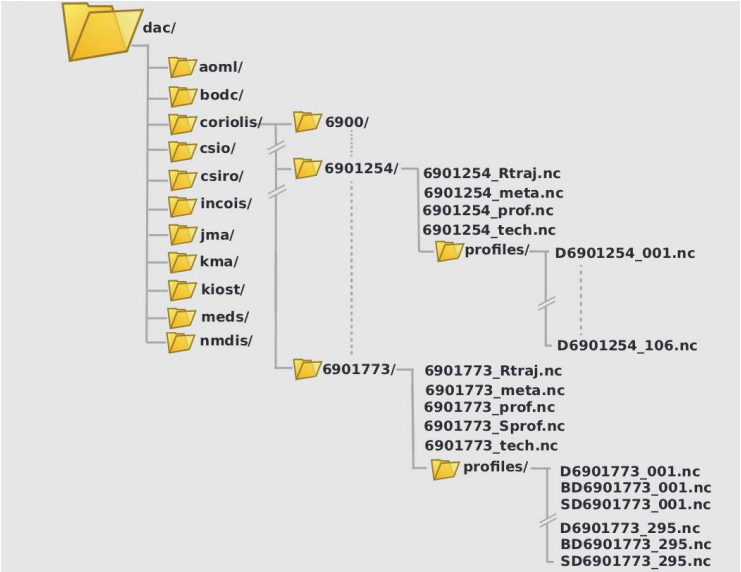
The Argo data files are stored on the Global Data Assembly Centre (GDAC) following a specific data
storage architecture.
- Each DAC has a list of folders with the float data
- Each float folder includes the following data files:
- _meta.nc - contains descriptive metadata information about the float.
- _Sprof, _Rtraj, _prof – contains an aggregated profiles
- _tech.nc - contains float technical information and engineering specifications of each cycle (e.g. dimensions and definitions, measurement codes, battery consumption, etc.)
- profiles:
- Core profiles: profile files (R... .nc, D... .nc) containing core data
- BGC profiles: profile files (BR….nc, BD… .nc) containing core data (only PRES) and b-profile files with various BGC parameters.
- Synthetic profiles: profile files (SR…nc, SD… .nc) which are generated by the GDACs to align core and BGC parameters obtained with different vertical sampling schemes, and make them available in one file.
The description of the Argo formats, the file naming conventions and more are documented in the Argo User's Manual.
Argo Data Format
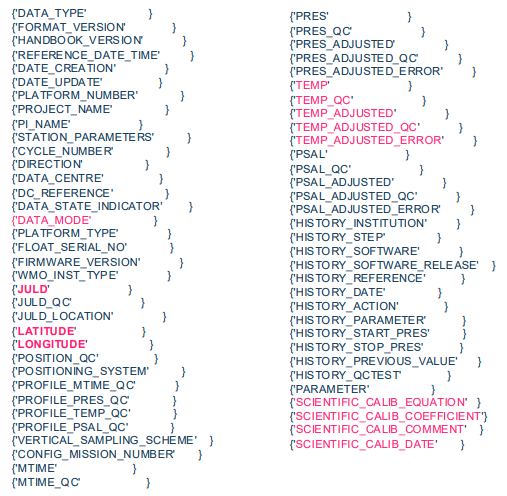
- Vertical profile data are stored in the community-agreed netCDF format
- Every cycle is recorded in an individual one netCDF profile file e.g. R5900400_001.nc, R5900400_002.nc ect...
- Data parameters measured by the float in the profile are recorded in the variables <PARAM> e.g. PRES, TEMP, PSAL,
- Each <PARAM> has an associated variable:
- <PARAM>_QC e.g. PRES_QC
- <PARAM>_ADJUSTED e.g. PRES_ADJUSTED
- <PARAM>_ADJUSTED_QC e.g. PRES_ADJUSTED_QC
- <PARAM>_ADJUSTED_ERROR e.g. PRES_ADJUSTED_ERROR
Argo BGC netCDF variable names list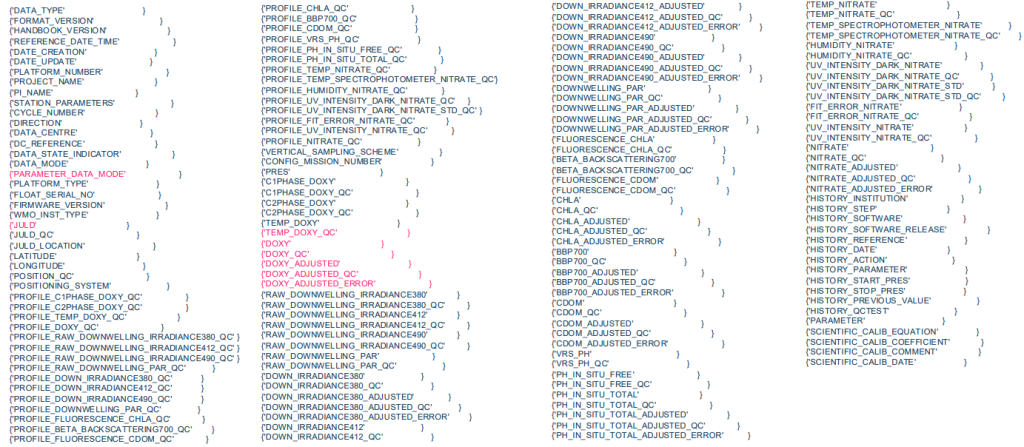
How to acknowledge Argo data?
Since Argo data are freely available, we kindly request that the following acknowledgement be included in any publication or product that utilises Argo data:
These data were collected and made freely available by the International Argo Program and the national programs that contribute to it. (https://argo.ucsd.edu,https://www.ocean-ops.org). The Argo Program is part of the Global Ocean Observing System.
How to cite Argo data
https://doi.org/10.3389/fmars.2020.00700
Argo dataset DOIs
Argo (2000). Argo float data and metadata from Global Data Assembly Centre (Argo GDAC). SEANOE. https://doi.org/10.17882/42182
If you used data from a particular month, please add the month key to the end of the DOI url to make it reproducible. The key is comprised of the hashtag symbol (#) and then numbers. For example, the key for August 2020 is #76230. The citation would look like:
Argo (2020). Argo float data and metadata from Global Data Assembly Centre (Argo GDAC) – Snapshot of Argo GDAC of August 2020. SEANOE. https://doi.org/10.17882/42182#76230